Fix My Speaker Dust: Clean Dust with Sound
If your phone speaker has slowly gone quiet, muffled, or tinny over weeks or months — without any water incident — dust is the likely culprit. Lint from pockets, dust from bags and desks, and fine grit all settle into the speaker grille and onto the membrane itself, muffling the sound. A fix my speaker dust cleaning sound can help: playing a tone that sweeps from 20 Hz to 500 Hz vibrates the speaker across a wide frequency range, shaking different sizes of particles loose. It's free, runs in your browser, and takes a few minutes.
Before you start
- Turn your volume up to maximum.
- Place the phone speaker-side down on a flat surface.
- Unplug headphones and turn off Bluetooth.
- Remove earbuds from your ears.
Plays a 165 Hz pulsing tone (1 s on / 0.4 s off) that vibrates water out of the speaker.
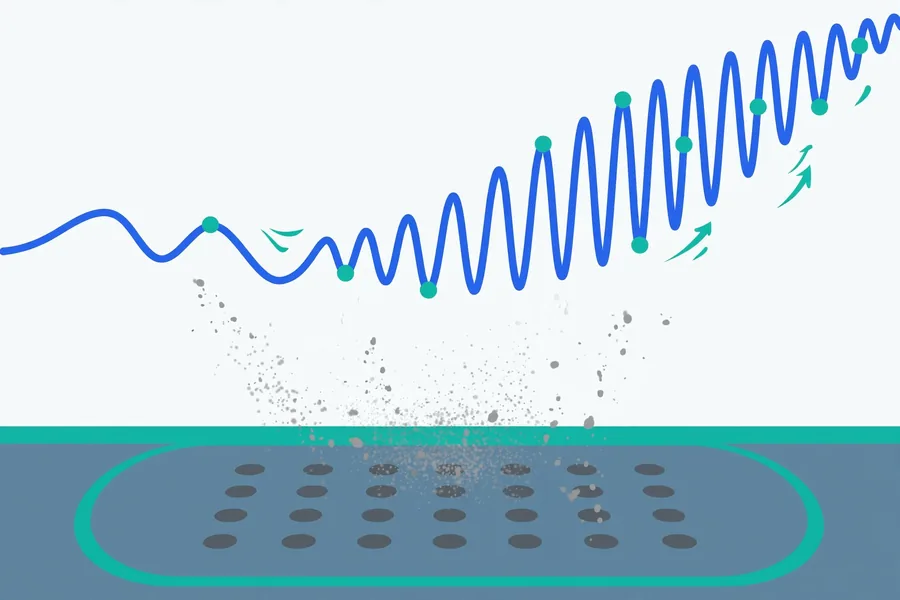
Sweeps a tone from 20 Hz to 500 Hz to shake dust loose from the speaker grille.
0:00 / 0:30
Cycle 1 of 1
Cycle complete 🎉
Did it help?
- Run one more cycle with your volume turned all the way up.
- If water got in, wait 20–30 minutes so it can dry, then try again — see what to do when your phone speaker isn’t working after water.
- If it sounds muffled, lint or dust may be blocking the grille — read why phone speakers sound muffled.
- Gently clean the speaker grille as shown in how to clean a phone speaker — never poke anything sharp into it.
- Still no luck? It may be hardware damage — contact us and tell us what happened.
Safety note: stop immediately if you hear rattling or distortion. Cleaning sounds can loosen water and dust, but they can’t repair hardware damage.
Why a frequency sweep works for dust
Different particle sizes respond to different vibration frequencies. A single steady tone only agitates particles that happen to resonate with it. Our dust mode sweeps continuously from 20 Hz up to 500 Hz, so as the tone rises and falls, it passes through the resonant range of fine dust, lint fibres, and larger grit one after another. The membrane moves farthest at the low end of the sweep, physically tossing particles off, while the higher end vibrates smaller, lighter particles loose from the grille mesh.
This is a fix my speaker dust remover in the physical sense: vibration dislodging particles so gravity and a cloth can take them away. It may help when dust is sitting loosely in the grille. It cannot remove dust that's been compacted into the mesh by months of pressure, wax-sealed by pocket grease, or forced deep inside the chamber — for that, mechanical cleaning comes first (see below).
Dust vs water: how to tell which you have
The symptoms differ, and so does the treatment:
- Dust: gradual decline over weeks or months; sound gets quieter and less crisp; one side of a stereo pair may be worse; visible dark buildup in the grille holes. Use the dust sweep mode.
- Water: sudden change right after rain, a splash, or a drop in liquid; sound is distorted, bubbly, or dramatically muffled all at once. Use the water eject mode — see the water eject guide.
- Both: if your phone got wet and you can see grime in the grille, run water eject first, let it dry, then run a dust sweep.
Step-by-step: clean dust from your speaker
- Brush the grille first. Use a soft, dry toothbrush or a clean soft-bristle brush. Gently sweep across the speaker holes to dislodge surface dust and lint. Don't push hard — you don't want to pack debris deeper. Never use anything metal or sharp, and never blow into the grille with your mouth (moisture!).
- Turn the volume to maximum and hold the phone with the speaker facing down over a clean surface.
- Play the dust sweep mode (20–500 Hz) for about a minute.
- Brush lightly again between cycles to clear what the vibration loosened, then wipe with a dry cloth.
- Run 2–3 cycles, testing with music after each. If improvement plateaus, stop — more cycles won't get what the first few missed.
Safety note
These sounds play at normal loud-music levels. Stop if you hear rattling, buzzing, or distortion — that's a sign of existing damage, and the sweep won't repair it. Never use compressed air cans directly into the grille at close range; the pressure can damage the membrane and the propellant can leave residue. A soft brush and the sweep are enough.
Keeping dust out: maintenance tips
- Pocket awareness: the lint capital of your life is your pocket. Carry the phone in a pocket without loose lint, or screen-in against your leg.
- Use a case with speaker cutouts, not mesh covers that trap dust against the grille. Wipe the cutouts when you clean the case.
- Monthly quick clean: run one sweep cycle once a month and give the grille a light brush. Two minutes of prevention beats a muffled speaker.
- Bags and toolboxes: if your phone rides in a work bag, use a zip pouch. Sawdust, metal filings, and sand are the worst offenders — magnetic particles from workshop environments can stick to the speaker's magnet permanently.
- Earbuds and laptops collect dust too — see the earbuds guide and laptop guide for device-specific approaches.
When sound alone isn't enough
Be realistic about limits. Sound cleaning helps with loose particles. It will not fix:
- Dust compacted into a solid layer over months — needs careful brushing first, possibly by a repair shop with proper tools.
- Grease or wax mixed with dust (common in earpiece speakers) — a dry brush and a slightly damp (not wet) cloth on the outer grille only.
- Magnetic workshop dust stuck to the internal speaker magnet — internal, and a shop needs to open the phone.
- Any crackling, one-sided silence, or no sound at all — that's hardware, not dirt. See when to see a repair shop.
FAQ
How does a dust cleaning sound work?
The tool plays a tone sweeping from 20 Hz to 500 Hz at maximum volume. The wide frequency range vibrates the speaker membrane across the resonant frequencies of different particle sizes, shaking loose dust, lint, and grit from the grille and membrane while gravity pulls them out.
Is the dust sweep safe for my speaker?
Yes, for a healthy speaker — it's normal playback-level sound. Stop if you hear rattling or distortion, which indicates an existing problem rather than something the sweep caused.
How often should I clean dust from my speaker?
Once a month is plenty for most people: one sweep cycle plus a light brush of the grille. If you work in a dusty environment, make it weekly.
Can I just use tape or a vacuum instead?
Sticky tape over the grille can lift surface lint, but it leaves adhesive residue that attracts more dust — not recommended. A soft brush is better. Household vacuums are too strong and can damage the membrane; the gentle vibration of the sweep is the safer engineered option.
Why is only one speaker quiet?
On stereo phones, one grille often faces your pocket while the other doesn't, so dust builds up unevenly. Try the sweep with that speaker facing down. If it's the earpiece speaker (calls only), check the earbuds and earpiece guide — earpiece grilles clog with skin oils and need a gentle brush first.
What if the sweep doesn't fix the muffled sound?
Brush the grille with a soft dry toothbrush and try once more. If there's still no improvement, the blockage is likely compacted or internal — or the speaker itself is damaged. A repair shop can clean or replace the driver inexpensively.